Notification Subscriptions
Notification Subscriptions let you opt in to automatic notifications when specific events occur in your projects. Subscriptions are custom configured for your company and can be set up for most data creation or edit events that occur within Puush.
Managing Your Subscriptions
- Go to Settings.
- Scroll to the Notifications section.
- Click Manage Notification Subscriptions.
- You will see notification types grouped by category.
- Toggle each notification type on or off using the switch.
- Click Save to apply your changes.
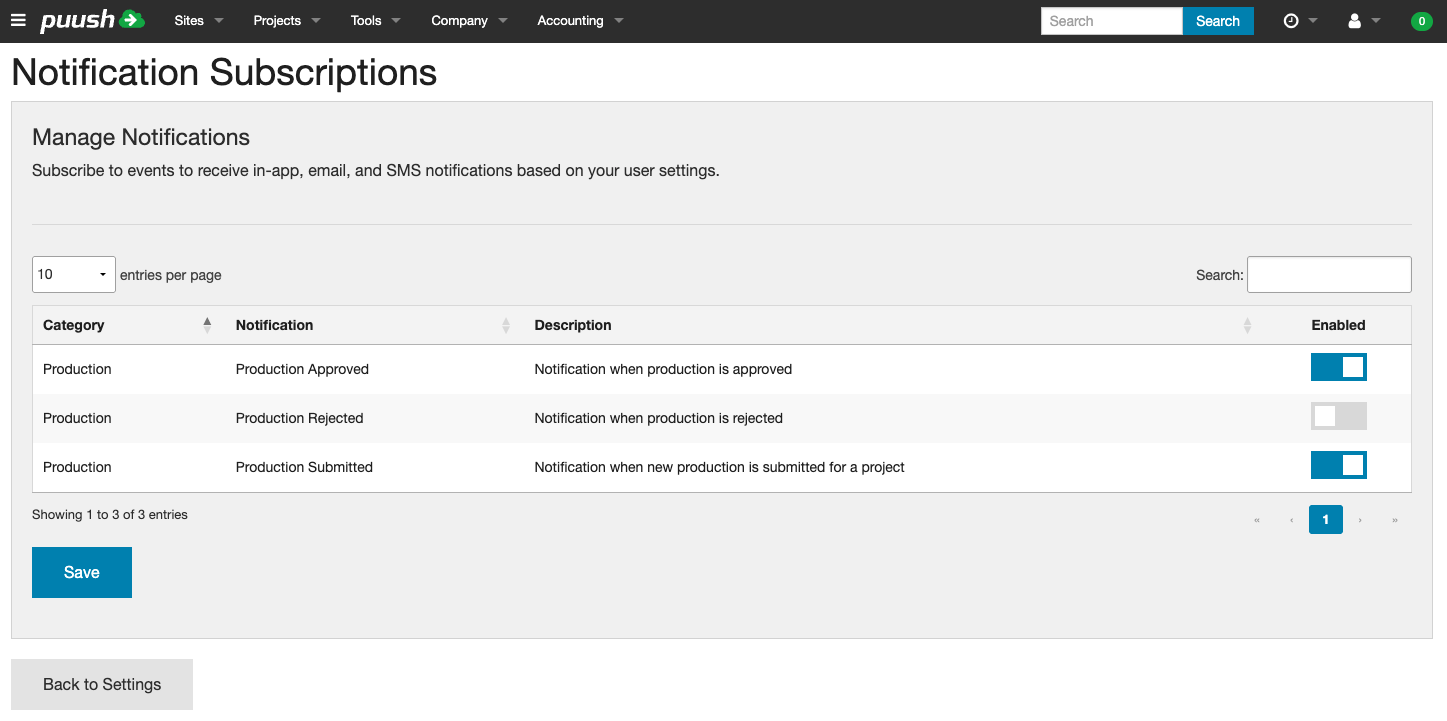
Example: Production Notifications
By default, the following production notification types are available:
| Notification | Description |
|---|---|
| Production Submitted | Fires when new production is submitted for a project |
| Production Approved | Fires when production records are approved |
| Production Rejected | Fires when production records are rejected |
These are just one example — your company administrator can configure additional notification types for other events across the system, such as report submissions, status changes, and more.
tip
Check this page periodically for new notification types as your company adds them.
How Subscriptions Work
- When you subscribe to a notification type, you receive a notification (in-app message, plus email or SMS if enabled) whenever that event occurs on any project you have access to.
- You will not be notified of your own actions — only actions performed by other users.
- Each notification includes a link to the relevant project and details about what happened.