Production Goals
Production goals let you set targets for specific work items and track progress as production is logged. Goals are defined at the project or site level and automatically link to production records by code.
Creating a Goal
- Navigate to the Production Goals section in a project or project site.
- Click the Add Goal button (requires Manage permission).
- Fill in the goal form:
- Name — A descriptive name for the goal.
- Code — (Optional) Links to your rate card. When set, production records with a matching code automatically count toward this goal.
- Target Quantity — The amount of work you're aiming to complete.
- Unit — The unit of measure (e.g., "each", "hours", "pages").
- Target Date — (Optional) When the goal should be completed by.
- Category — (Optional) A pricing category for grouping.
- Description — (Optional) Additional details about the goal.
- Click Save.
Goal Form
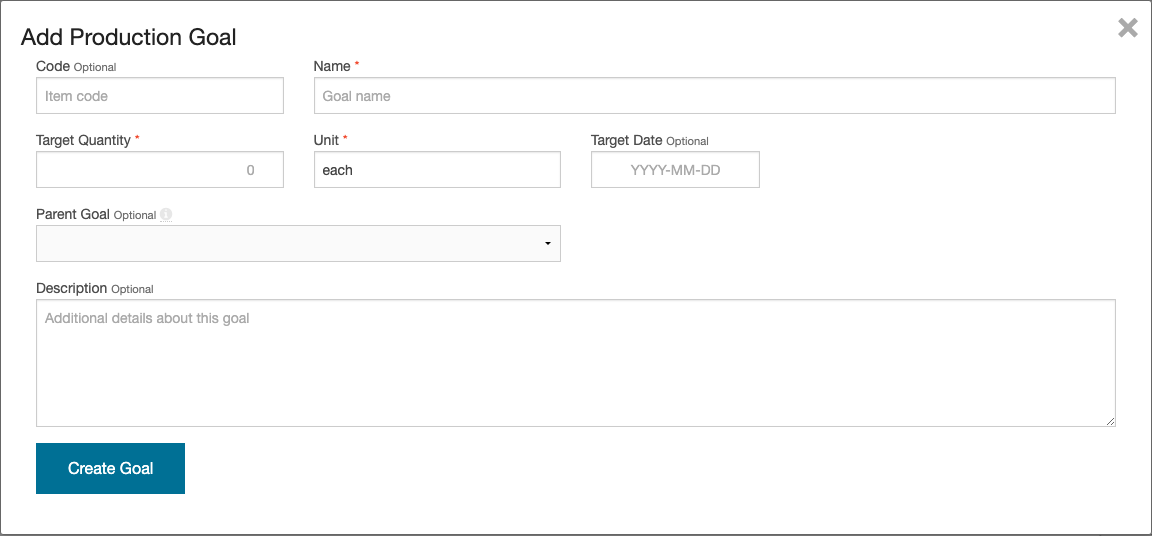
Exmaple Goal

If you select a code that exists in your rate card, the unit and category fields will auto-fill from the rate card item.
Parent/Child Goal Hierarchy
Goals can be organized into a parent-child hierarchy. When creating or editing a goal, select a Parent Goal to nest it under an existing goal.
Child goals let you break a large goal into smaller, trackable pieces. For example, a parent goal of "Install 1000 Panels" could have child goals for each site or phase.

When a parent goal has child goals with matching codes, production matched to child goals is not double-counted on the parent. The parent's progress reflects only production that matches its own code but not any child's code.
How Production Links to Goals
Production records link to goals in two ways:
- Automatic (by code) — When a production record's code matches a goal's code (case-insensitive), it automatically counts toward that goal.
- Manual (by selection) — When logging production, you can manually select a specific goal from a dropdown, regardless of code.
Waterfall Allocation
When multiple sibling goals share the same code, production is allocated using a waterfall approach: goals with the earliest target date are filled first. Once a goal reaches its target quantity, additional production spills over to the next goal.
Goal Status Indicators
Each goal shows a status based on current progress:
| Status | Meaning |
|---|---|
| Complete | Production quantity meets or exceeds the target |
| On Track | Progress is on pace to meet the target date |
| Behind | Progress is below the expected pace for the target date |
| Not Started | No production has been logged against this goal yet |

Editing and Deleting Goals
- To edit a goal, click the edit icon next to it in the goals table. You can change any field including the target quantity and date.
- To delete a goal, click the delete icon. You will be asked to confirm before the goal is removed.

Deleting a goal does not delete the production records linked to it. Those records will simply no longer be associated with any goal.